
Your solar workforce.
Always at work.
Seven specialists who already know solar operations — plan-set QC, survey review, AHJ research, utility paperwork, single-line diagrams, financier milestones. They work inside your own Drive, mailbox and CRM, and bring back finished work. You approve what leaves.
One platform.
Multiple workflows.
The work compounds when every team asks the same system for context. Hub connects the people, files and decisions that make a solar project move. Start with one workflow. Bring the whole shop along.
Solar specialists, one shared brain.
Hiring for solar ops means finding someone who can read a drawing set, chase an AHJ and assemble a milestone pack. This is that hire, split seven ways.
You describe the outcome, not the tool
Hub reads the job and hands it to whoever owns that work, then pulls in a second specialist the moment the first one hits something outside its lane.
The queue keeps no office hours
Drop the week's plan-sets in at six and read the findings at eight the next morning. Nothing waits for a person to be free.
Nothing happens off the books
Who ran it, what they found, what you approved — all of it stays in the thread, readable a year later without having to ask anyone.
Pick one. See what it hands back.
Seven focused agents cover the operational details that make solar projects feel heavy. Each one owns a job — pick one and look at the actual thing it returns.
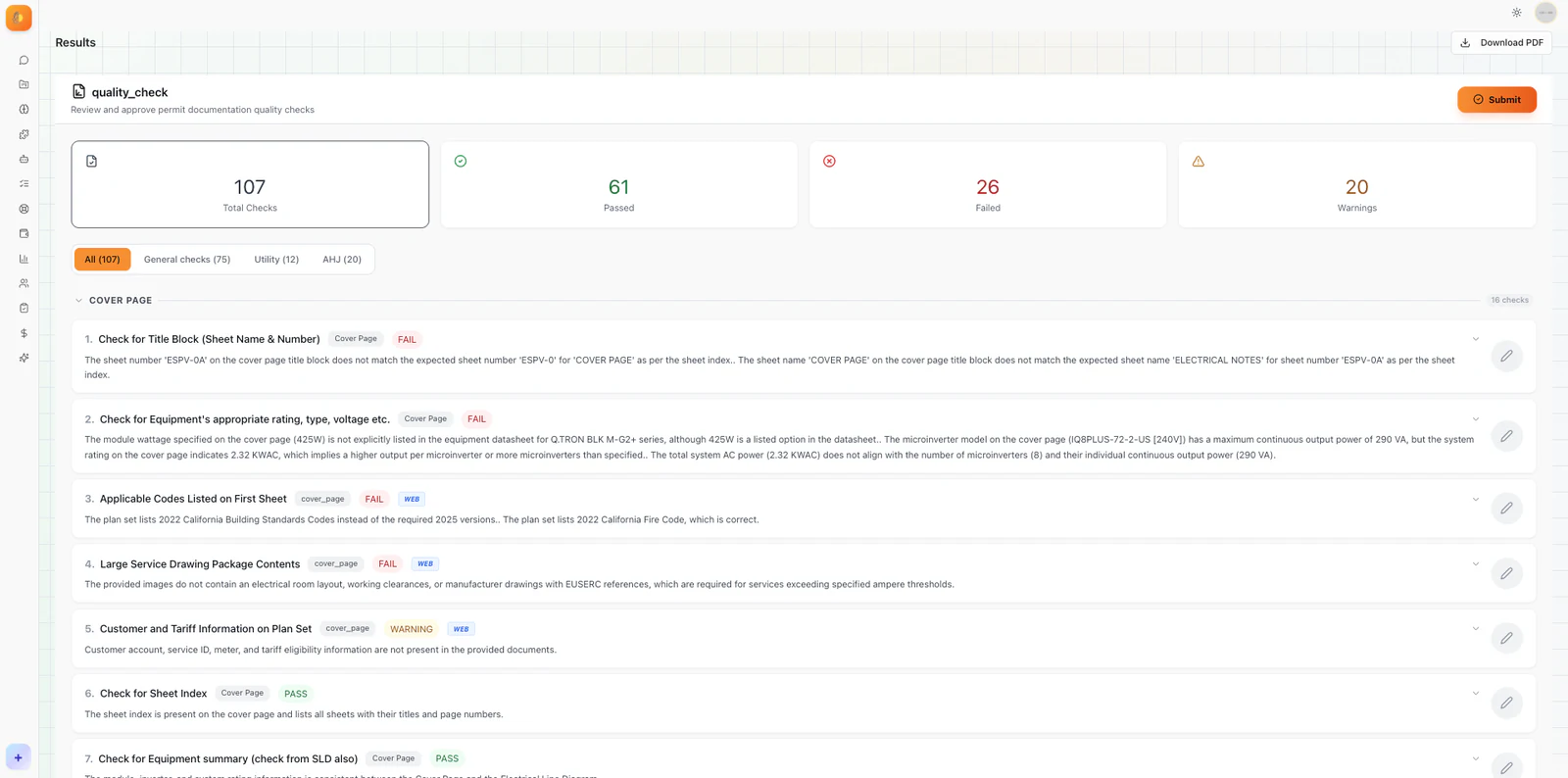
Nora
Reads a full drawing set against your QC checklist — electrical, structural, design — and returns every issue with its severity, its sheet and the code it breaks.
Ask. They work. You approve.
No dashboard to configure, no workflow to draw. Describe the outcome and Hub decides who does it.
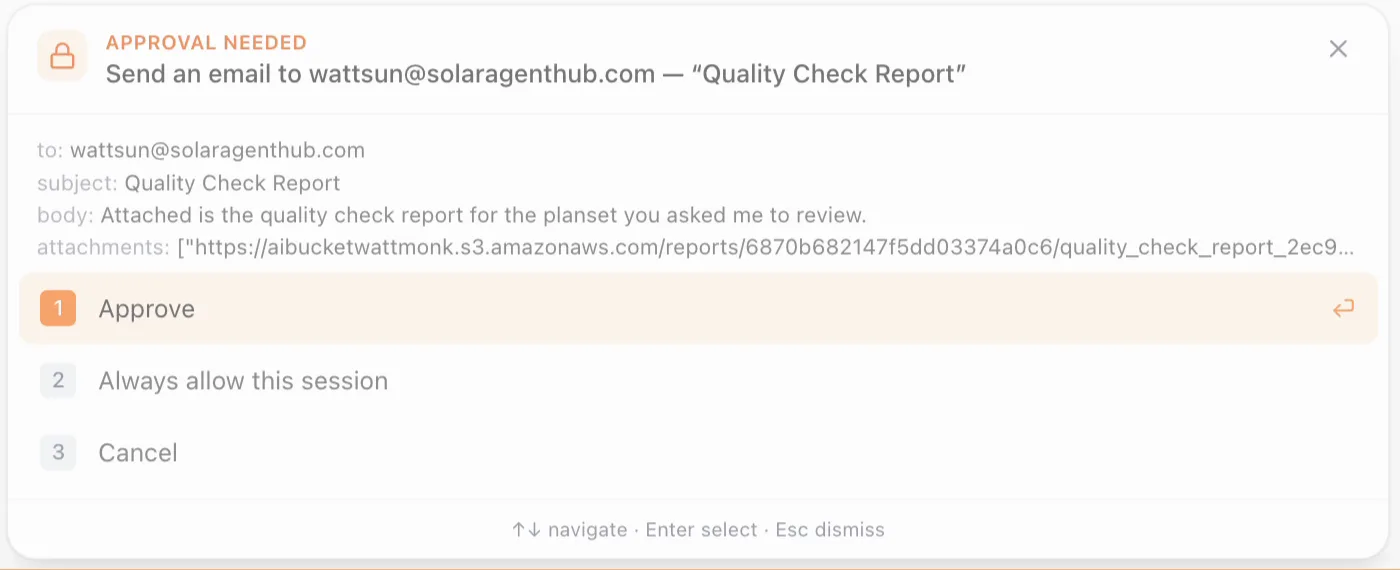
Nothing leaves without you
Emails, uploads and portal submissions all pause on a card showing exactly what will happen — who it goes to, what it says, what is attached. Until you approve it, nothing has been sent.
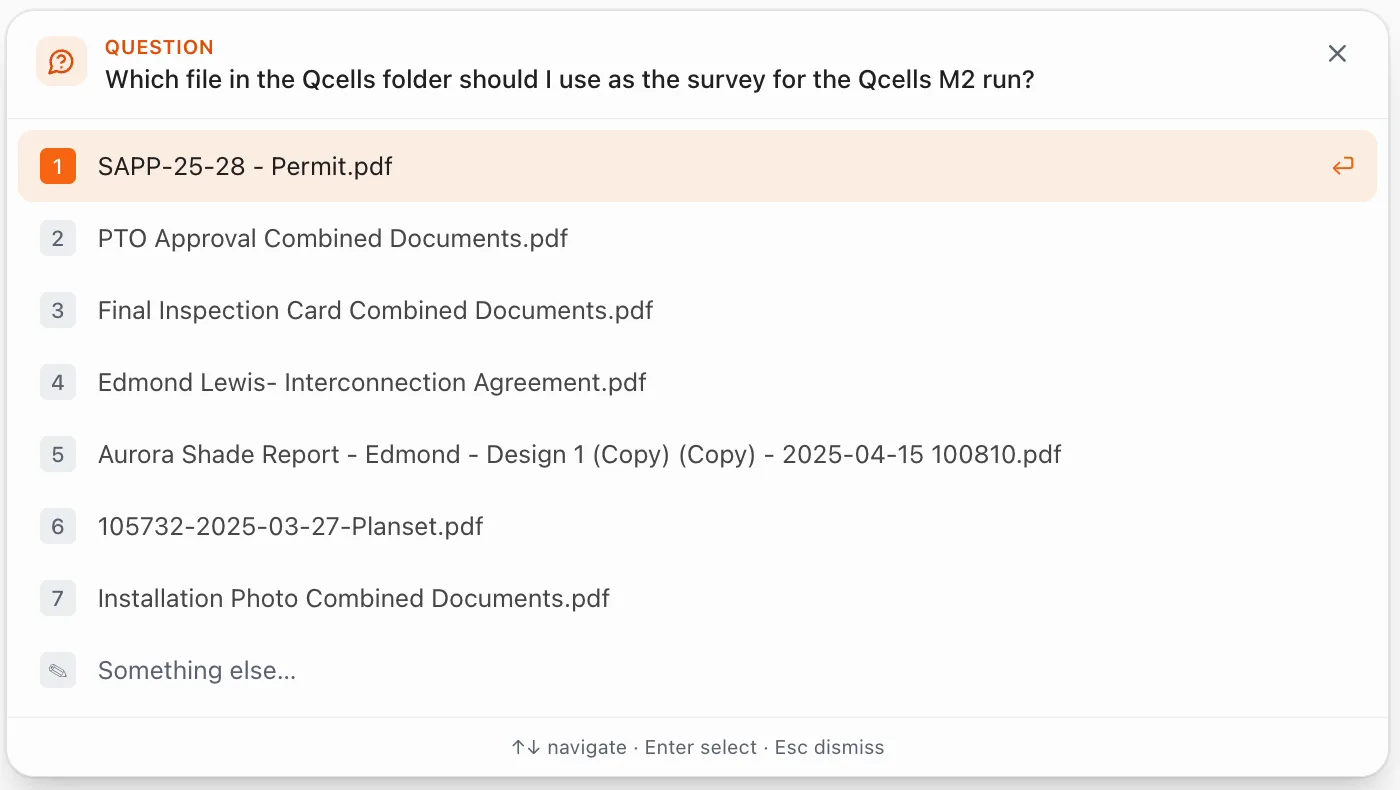
It asks instead of guessing
When more than one file could be the one you meant, it stops and asks — rather than picking wrong and being three steps down the road before anyone notices.
Then it repeats itself
Say “automate that” and the job you just ran becomes a schedule. It fires on its own after that — step by step, in the open, with a record of every run.
One bench, every desk in the shop.
The same specialists, pointed at whatever that team is drowning in this week.
The AHJ answer before you quote
Office, submittal route, code cycle, and what that jurisdiction rejected you for last time.
Nothing filed with an open critical
The set is checked against your SOP before it goes anywhere, and the filing is held until a clean revision comes back.
On the job in an afternoon.
A real sequence — each step only makes sense once the one before it is done.
OAuth into the Drive or mailbox your plan-sets already live in. Nothing is copied out of it.
QC checklist, approved-equipment list, financier requirements. Hub reads them; you keep them.
Point at a folder and ask for a quality check. The findings come back with the sheet and the code behind each one.
Read the findings, edit the draft, approve the send. The receipt stays in the thread.
The job you just ran becomes a schedule or a trigger, and stops needing you to start it.
A chat window is not a colleague.
General models can discuss solar. That is a different job from doing the work inside your accounts and being accountable for it.
| Chat assistant | Solar Agent Hub | |
|---|---|---|
| Where it runs | A browser tab, detached from your systems | Inside your Drive, mailbox and CRM, on your own OAuth |
| What it knows | The public internet, plus whatever you paste in | Your SOPs, your AHJ history, your approved-equipment list |
| Who does the work | One generalist model | Seven specialists, each owning a stage of the job |
| Starting a task | You, every single time | You, a schedule, or a trigger |
| Acting outward | It cannot — you copy the output out yourself | It drafts and sends, but only after you approve |
| What comes back | Text in a thread | A finished artifact — QC report, filled form, single-line diagram |
| The record | Scrollback you have to reconstruct | A per-run receipt: who ran it, what changed, who approved |
| What it costs | A seat per person, used or not | One plan, an allowance the whole team draws from |
It works where your work already is.
Everything happens inside your own accounts, with your own permissions. Nothing is copied into another system, and nothing happens without your approval.
Connected through OAuth, in your own accounts. The catalogue is served live, so new connectors appear here as they are added.
Every tool forgets. Yours won't.
Upload your SOP once. Correct a specialist once. From then on it holds for every job and everyone on your team — and you can read, edit or delete anything it believes.
Held until a clean revision comes back. Sarah is the only override.
Set by you · applied to every filingCheck the E-sheets before filing anything in Hayward.
From Acme_QC_SOP_v4.pdf · page 11Archived to /Filed once submitted.
From past conversations · used by 2 workflowsIt works for you, not around you.
A workforce with access to your mailbox and your Drive has to be provably restrained. Here is how that is enforced.
One plan for the shop, not a seat per head.
A plan carries an allowance the whole team draws from. Nobody has to be left off the account to keep the bill down, and work that never ran never spent anything.
The whole bench is included
Every plan opens every specialist. There is no tier where plan-set QC is available and survey review is not — you are choosing how much work you expect to run, nothing else.
You see the cost before you commit
Each run shows what it will draw before it starts, and what it actually drew when it finishes. Nothing is reconciled at the end of the month for the first time.
Seats are free, work is not
Add your permitting coordinator, your designers and your field lead without changing the bill. Adding people costs nothing; running more work is the only thing that does.
What people ask first.
The ones that come up on every call, answered without the hedging.
Let your team
move as one.
Give your operators a workforce that understands the work, not just the words. Connect one app and hand over the first job tonight.